

PingHoot Features / Website Monitoring
Website monitoring
Hassle free.
PingHoot checks your website around the clock for downtime, content problems or SSL problems, and lets you know when something needs your attention.
Start monitoring for free5 monitors freeNo credit cardSet up in seconds
Your sites
All systems operationalThe little coffee shop
https://coffee.example
Your next big idea
https://nextbigidea.example
The portfolio
https://portfolio.example
Owl good. All sites up.
All monitored websites are passing their checks.
What is website monitoring?
A simple way to know when your website isn't working.
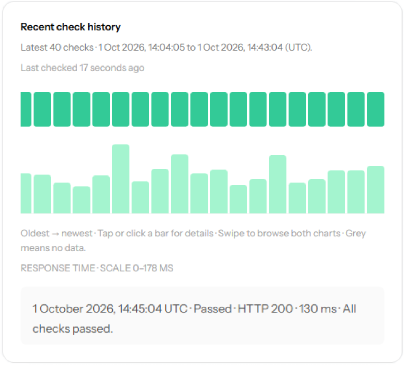
Website monitoring automatically checks your website at regular intervals to make sure it is available and responding as expected. PingHoot makes HTTP or HTTPS requests to your chosen URL and checks the response, response time, content and SSL certificate.
If a problem is detected, PingHoot can confirm the issue with a second check before creating an incident and sending you an email or sms alert. When your website recovers, you can optionally receive a recovery notification.

Think of it as a quiet, reliable owl that checks your website for you, so you don't have to keep refreshing it yourself.
PingHoot checks
your website
We confirm if there's
a problem
You get an alert
We keep checking
and let you know
when it's back online
What should you monitor?
Keep an eye on the parts
that matter most.
It's not just the homepage that needs monitoring. Different pages on your site can affect your visitors and business in different ways, so it's worth monitoring the ones that matter most to you.
Homepage
Your first impression. If this is down, visitors may not try again.
Checkout or login
Critical for revenue and user access.
Key landing pages
Campaign pages, product pages or other important entry points.
Contact or enquiry forms
Make sure people can still get in touch.
Essential endpoints
APIs or specific URLs used by your application.
Monitored URLs
https://yourwebsite.com
Homepage
https://yourwebsite.com/pricing
Pricing page
https://yourwebsite.com/checkout
Checkout
https://yourwebsite.com/contact
Contact form
https://api.yourwebsite.com
API endpoint
What can go wrong?
Spot problems before
they become bigger problems.
Websites can stop working for lots of reasons. Some are short lived, others can last much longer. Monitoring helps you find out about issues sooner, so you can investigate and resolve them.
Complete outages
Your site is offline and not responding at all.
Deployment mistakes
A change breaks part (or all) of your site.
Server errors (5xx)
Your server returns an error response.
Unexpected content
A page loads but shows an error message instead.
DNS problems
Your domain can't be resolved.
SSL certificate issues
Certificates expire or become invalid.
Slow response times
Your site is online but very slow.
This page isn't working
How PingHoot Monitors Your Website
More than just a simple ping.
Each PingHoot monitor can perform multiple checks, giving you a more complete picture of how your website is performing.
Availability checks
Regular HTTP and HTTPS requests to check your site responds.
Response time monitoring
Track how quickly your pages are responding.
Content checks
Look for text that should (or shouldn't) appear on a page. Find out more
SSL Monitoring
Check certificate validity and get warned before expiry.
How Often Should A Website Be Checked
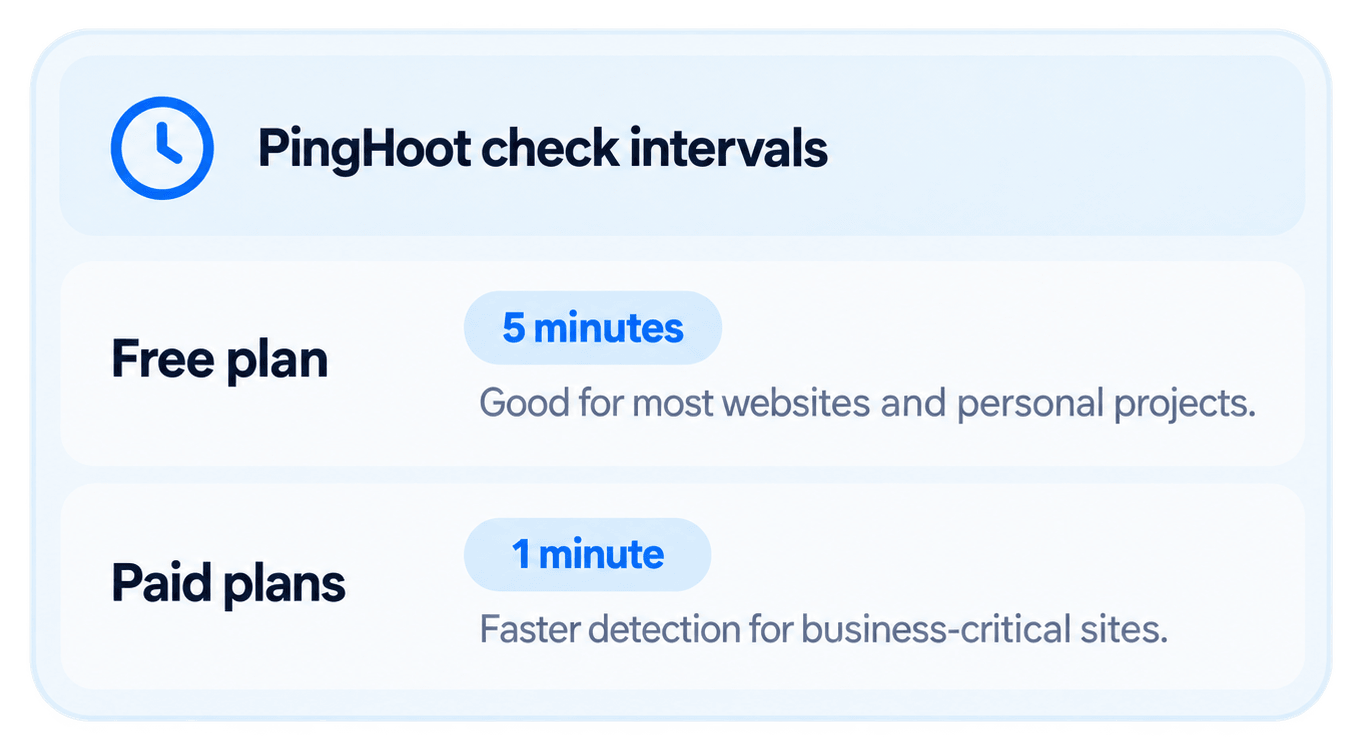
Shorter intervals mean faster detection.
PingHoot can check your website every 5 minutes on the free plan, with 1-minute checks available on paid plans. Shorter intervals can reduce the time between a problem starting and you finding out about it.
For example, with 5-minute checks a problem could exist for a few minutes before the next scheduled check. With 1-minute checks, issues can be detected sooner, giving you the chance to investigate and resolve them more quickly.
The Bigger Picture
Why website monitoring matters.
The sooner you know there's a problem with your website, the sooner you can do something about it. Without monitoring, an outage or broken page can go unnoticed until you happen to spot it yourself, or worse, a customer tells you.
Website monitoring works quietly in the background, checking your site at regular intervals and bringing problems to your attention when something needs investigating. That matters whether you run a single business website, an online shop, a portfolio of client sites or something more complex.
Monitoring also gives you something website analytics can't. Analytics tells you what visitors did when they reached your website; monitoring checks that there's a working website for them to reach in the first place. If your site goes down, analytics may simply show fewer visitors or no activity at all. Monitoring actively checks for the problem.
Effective website monitoring should be simple: check reliably, avoid unnecessary alerts, make problems easy to understand and let you know when your site has recovered. Depending on your website, it can also mean keeping an eye on response times, important page content and SSL certificates rather than simply checking whether a URL responds.
That's what we've built PingHoot to do: straightforward website monitoring that keeps watch when you aren't.
Questions? We have answers
View our FAQs page for quick answers to some common questions about website monitoring with PingHoot.

Leave the night shift to the owl.
Close the laptop. PingHoot will keep watch and alert you when your websites need attention.
Start monitoring for free