

PingHoot Features / Email & SMS Alerts
Email & SMS alerts.
Know the moment something's wrong.
Get email or SMS alerts when PingHoot confirms a problem with your website, so you can investigate quickly and keep your visitors informed.
Start monitoring for free5 monitors freeNo credit cardSet up in seconds
Your sites
All systems operationalThe little coffee shop
https://coffee.example
Your next big idea
https://nextbigidea.example
The portfolio
https://portfolio.example
Owl good. All sites up.
All monitored websites are passing their checks.
Please note: free plans do not have any monthly sms credits, but can purchase a credit pack.
Alerts that keep you informed.
Choose how you want to be alerted.
PingHoot can notify you by email and/or SMS when we detect a problem with your website. You'll receive an alert after PingHoot confirms a problem, so you can investigate and get it fixed.
You can also choose to receive a recovery alert when your website is back online, giving you peace of mind that everything is working again. For those who are more technical, we also offer a webhook which allows you to receive alerts and handle them how you wish.

Get the right alert, at the right time. So you can take action before your visitors notice.
We detect a problem
with your website.
You receive
an alert email or SMS.
You investigate
and fix the issue.
We let you know when
your site is back online
(optional)
Flexible notification settings
Keep an eye on the parts
that matter most.
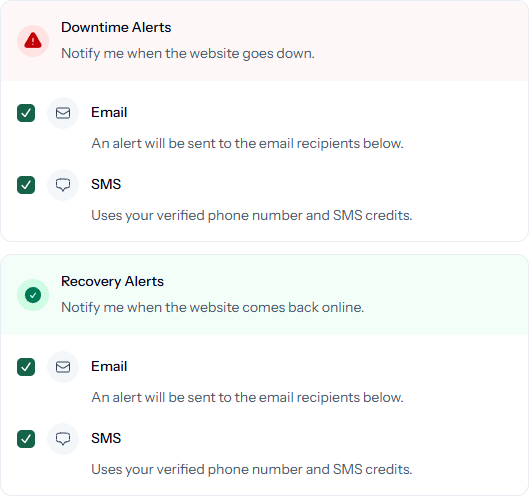
You're in control of how and when you're alerted. Choose which channels to use, what events to be notified about, and who should receive the alerts.
Email alerts
Receive email notifications when a website problem is confirmed.
SMS alerts
Get text message alerts for critical downtime (SMS credits dependent on plan)
Customise alert types
Choose between downtime alerts, recovery alerts, or both.
Choose alert contacts
Send alerts to the right people (adding more than one alert contact is a paid feature)
Per-monitor settings
Set different notification preferences for each website.
Stay ahead of problems
Be the first to know
when things go wrong.
Whether it's a complete outage, a server error, an expired SSL certificate or unexpected content, PingHoot will alert you after confirming the issue so you can take action before it impacts your visitors, sales, or reputation. Plus, incident and monitoring history are saved in your account so you can check out the data at any point.
Complete outages
Your site is offline and not responding at all.
Deployment mistakes
A change breaks part (or all) of your site.
Server errors (5xx)
Your server returns an error response.
Unexpected content
A page loads but shows an error message instead.
DNS problems
Your domain can't be resolved.
SSL certificate issues
Certificates expire or become invalid.
Slow response times
Your site is online but very slow.
This page isn't working
Stay alert on paid plans
Critical alerts, wherever you are.
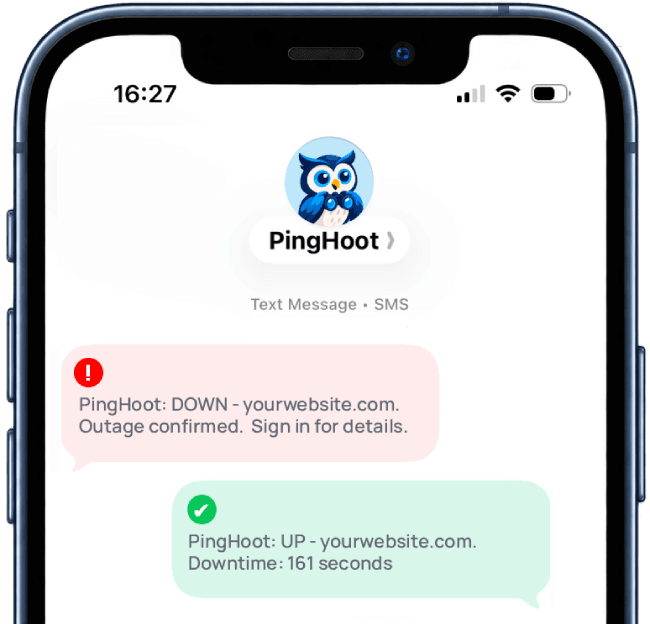
SMS alerts when your website goes down gives you even greater peace of mind. Paid plans come with a set number of monthly SMS credits, with additional credits available to purchase (including on the free plan).
Instant notifications
Get alerted even when you're not checking your emails.
Perfect for critical sites
Ideal for business-critical websites or client sites.
Available on all paid plans
Each paid plan includes a monthly SMS allowance
Need more?
Purchase additional SMS credits at any time.
The Bigger Picture
Why alerts matter.
Knowing that your website is being monitored is useful, but monitoring only really helps if you find out when something goes wrong. Email and SMS alerts bridge the gap between detecting a problem and being able to do something about it.
Without automated alerts, a website problem can easily go unnoticed. You might only discover an outage when you happen to visit the site yourself or hear about it from a customer, or when you notice an unexpected drop in activity. For businesses that depend on their website for enquiries, bookings or sales, that could mean a problem has already been affecting visitors for some time.
PingHoot can send an alert when monitoring detects a problem with your website, giving you the opportunity to investigate sooner. Depending on your notification settings you can also receive a recovery alert when the site is responding normally again. That means you don't have to repeatedly check the website yourself while an incident is ongoing.
Email or SMS?
Email alerts are a simple option for everyday website monitoring. They can keep you informed without requiring another app or dashboard to be open, and they're particularly useful when alerts need to reach several people.
SMS alerts provide another way to get your attention when an issue is more urgent. A text message can be useful for important websites where you want to know about downtime even when you're away from your computer or aren't actively checking email.
You don't necessarily have to choose one or the other. Different websites and different types of alerts can justify different notification methods.
Getting useful alerts, rather than just more alerts
Good website alerting isn't about sending as many notifications as possible. An alert should tell you something useful and arrive when there's actually something worth investigating.
That's why PingHoot confirms a problem before creating an incident and sending an alert. Monitoring then continues while your website is experiencing the problem, so PingHoot can detect when it has recovered and let you know that things are working normally again.
Notification settings also let you decide how you want to be contacted. You can use email, SMS or both, and choose whether you want downtime alerts, recovery alerts or both depending on how you monitor your websites.
Whether you're responsible for a single business website or a portfolio of client sites, the principle is the same: the sooner you know there's a problem, the sooner you have the opportunity to investigate it.
That's the role of PingHoot's alerts - turning website monitoring into something you can actually act on.

Leave the night shift to the owl.
Close the laptop. PingHoot will keep watch and alert you when your websites need attention.
Start monitoring for free