

PingHoot Features / Webhook
Send uptime alerts
to your own systems.
Send monitoring alerts to a URL of your choice when your website fails its configured checks, and optionally when it recovers. Connect PingHoot to your own applications and workflows.
Start monitoring for free5 monitors freeNo credit cardSet up in seconds
Your sites
All systems operationalThe little coffee shop
https://coffee.example
Your next big idea
https://nextbigidea.example
The portfolio
https://portfolio.example
Owl good. All sites up.
All monitored websites are passing their checks.
Please note: webhook is a paid feature only.
What are webhooks?
Monitoring alerts for your applications.
Webhooks let PingHoot send an HTTP POST request to a URL that you specify when a monitor confirms a failure, and optionally when all its configured checks pass again.
This allows you to integrate PingHoot with your own applications, dashboards or workflows, so you can react to incidents in real time.
Webhooks are available on our paid plans and can be configured for each website monitor.

Webhooks are a paid feature, available on Essential, Pro and Agency plans.
We detect a problem
with your website.
We send a webhook
POST request to your URL.
Your system receives the
alert and can take action.
How it works
Simple to set up
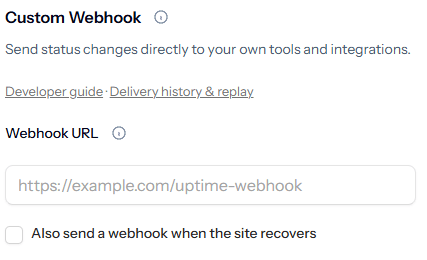
If you want to do more than just receive email & sms alerts, add a webhook URL when creating or editing a monitor, and choose whether you'd like to receive an alert when the site recovers.
Add your URL
Enter the webhook endpoint you want to send alerts to.
Choose your events
Receive confirmed failure alerts and choose whether to include recovery alerts.
We send a POST request
When an event occurs, we send a JSON payload to your URL.
Build your integration
Use the data in the payload to trigger notifications, create tickets, your own status page or take other actions.
Webhook Payload
All the information you need.
Each webhook includes details about the monitor, the event type and relevant technical information, so your system can take the right action.
Event type
Identify failure or recovery events. The trigger field distinguishes website, keyword and response-time issues.
Monitor details
Includes the monitor name and URL.
Timestamps
See when the incident was detected.
Status information
HTTP status code, response time and more.
{
  "id": "a7dc5203-1b80-48fa-9772-834b1494dd52",
  "event": "monitor.down",
  "monitor": {
    "id": 123,
    "name": "My Website",
    "url": "https://example.com"
  },
  "status": "down",
  "trigger": "website_down",
  "reason": "Unexpected HTTP status: 503.",
  "checked_at": "2026-09-14T12:00:00+00:00",
  "http_status": 503,
  "response_time": 350,
  "downtime_seconds": null
}Examples
Use webhooks your way.
Webhooks let you connect PingHoot with your own applications, workflows and third-party tools. PingHoot sends the event data to the webhook URL you provide - what happens next is up to you.
Connect to messaging tools
Use your webhook to build workflows that send PingHoot alerts to tools such as Slack, Microsoft Teams or Discord.
Create support tickets
Use webhook events to create tickets in your helpdesk or support system.
Trigger custom workflows
Run your own scripts, automations or other processes when an event occurs.
Update internal dashboards
Feed PingHoot events into your own dashboards or internal systems.
You build and control the integration. PingHoot sends the webhook event to your chosen URL.
Reliable and secure
Built for reliability.
Use an HTTPS endpoint to protect webhook traffic. Every delivery is recorded, so you can inspect the response and replay a failed delivery from your webhook history after fixing your endpoint.
HTTPS requests
Use HTTPS for secure POST requests to your endpoint.
Delivery history and replay
Inspect failed deliveries and replay them when your endpoint is ready.
Consistent format
A clear JSON structure for every event.
HTTPS webhook requests
Choose an HTTPS webhook URL to keep your notifications encrypted in transit.
Find payload examples, event fields and guidance for protecting your endpoint.

Leave the night shift to the owl.
Close the laptop. PingHoot will keep watch and alert you when your websites need attention.
Start monitoring for free